Author Archive

Apr
03

Editable Menus

Managing a site’s menus can be a challenge, especially for people who don’t understand HTML. So how can you let your clients manage them without looking at any code or needing to worry about each page that menu appears on?

Using Konductor’s menu management tool, you can design their site so they only need to update a menu in one place, without any code, and it’ll then automatically apply across all the pages that use it.

Here’s how to set up your template(s):

  1. In the DWT (Dreamweaver template) that needs a menu, create a dummy menu using an unordered list. The list items themselves don’t need to be the final product as they’re just a placeholder, but give them the CSS attributes that they’ll need. Your code will look something like this:
  2. <ul id="topnav" class="big">
    	<li><a href="/cat.html">Cat</a></li>
    	<li><a href="/dog.html">Dog</a></li>
    	<li><a href="/bird.html">Bird</a></li>
    </ul>
    
  3. Select this code inside Dreamweaver, with the ends of the selection being the unordered list tags.
  4. Make this menu an editable region (Insert > Template Objects > Editable Region).
  5. In Design View, click this new editable region’s top tab. This will cause Konductor’s properties inspector to show.
  6. Select “Menu Region…” in Konductor’s properties inspector.
  7. Save and upload the newly edited DWT.

This video recaps the above:

Now that the template is ready, you’ll be able to build and manage this menu in the Konductor app:

Here are some example files that you can practice on to create editable menus. The template “editable-menus.dwt” in /Templates is already completed for you, so try to mimic it using “to-make-editable.html”: Editable Menus Example Files


Nov
12

“When to add CMS?”

Konductor Hat In Vancouver

When should you start thinking about a CMS while designing a website? Probably around the same time that I noticed the numbers in the above image were the same as today’s date, long after the shot was taken. Most designers think about a CMS long before they start doing any work on the site itself. That’s inefficient. CMS should be allowed to be an afterthought.

One of the reasons Konductor exists is because of these frustrating workflows. Designers design websites because the web is open to whatever designs you want to create—so why treat your workflow any differently?

Sites managed with Konductor are built using native Dreamweaver templates, and Dreamweaver templates are essentially glorified HTML pages. If you can build an HTML page, then you can build a site on Konductor. Doing things this way means you can add the CMS at step one of designing, or long after the site has already been live on the web.

If you’re looking for a rigid and overly structured CMS that tells you how your sites should be built and designed, then Konductor’s not for you. If you’re looking for a CMS that will work with your style of designing, then we can help; we’ve thought about this a lot.

This isn’t a sales pitch per say, it’s just a question that we get asked a lot. You literally get that much freedom!


Oct
14

Manage Menus with Konductor

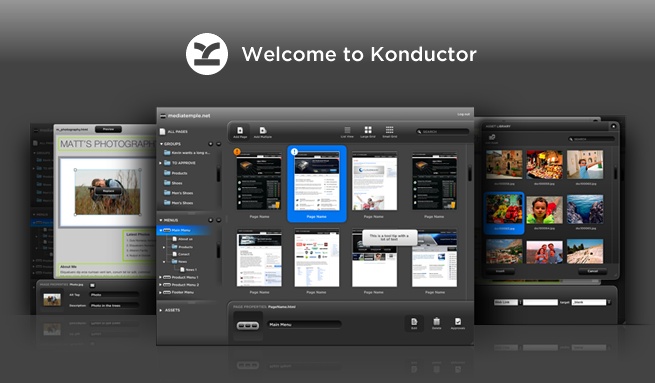
Websites have content and if you have more than one page on a site then you’ll probably need some navigation as well. With Konductor you can allow your clients to manage not only that content but also the menus and links which lead to them.

By defining an editable region as being a menu in Dreamweaver you’re essentially defining a placeholder for where you and your clients can later start building and inserting menus dynamically from within the Konductor application. These menus will also be styled exactly how you want since we only use the CSS that you include. Since pages are built in the application, why not menus as well?

For more specifics on how to define and then build menus with Konductor see the following videos:


Jul
06

Konductor Video Tutorials

How does Konductor work? How can I make parts of my site editable? Can you manage menus dynamically? Questions like these are common to hear from designers new to Konductor. Yesterday, if you had asked us one of these questions, we would have sent you to our help documentation. Starting today we can now show you how to do what you need to do with Konductor.

Over the last few weeks we’ve produced a number of tutorial videos that we’re now pleased to release to you through our YouTube account. Everything from downloading the tools you need to how to work with links and anchors within content regions is covered. Here are two of the playlists we’ve put together, one for designers and one for your clients:

Designer tutorials playlist:

Client tutorials playlist:

We hope that you enjoy and learn lots from these videos. If you have any requests or suggestions for new videos, feel free to leave a comment. And don’t forget that we’re still here to help one-on-one as well, so if you have any questions that aren’t covered in a video, someone will be sure to get back to you pronto.


Jan
08

Konductor Featured on the Dreamweaver Exchange

The fruits of our ideas and labor are growing. We’re pleased to announce that the Konductor Extension for Dreamweaver is currently the featured product on the Adobe Dreamweaver Exchange! Thank you to all 7,400+ people who, at the time of writing this, 10,000+ people have downloaded the extension and are beginning to see and express just how valuable Konductor can become to their design business.

We’re really happy to be receiving great responses from designers all over the world. Keep the feedback coming and know that we’re here because we support what you designers already do, without making your life more complicated.


Nov
16

Interview with The Digital Scene

Another interview has been posted with Derek Zarbrook, this time with The Digital Scene at Adobe MAX 2009. If you watch closely, you’ll even get a little sneak peak of what’s to come with Konductor in the near future. Enjoy.


Nov
03

RedMonk on Konductor’s Use of Adobe AIR

RedMonk has posted a great interview with Derek Zarbrook on Konductor’s unique use of Adobe AIR. Included below is the interview and a nice demo of the system in action as well.

Michael Coté:

Thus far, most examples have really just been web pages on the desktop that, at best, have off-line modes or are closed-up video players. It was nice, then, to find a use of AIR that took moved beyond these uses in Konductor’s AIR client.

Read the full article.


Oct
21

Back from MAX 2009

Konductor PC World Writeup

Thousands of people and hundreds of demos later, we’re finally back in wet Vancouver after Adobe MAX 2009. We had a really great time down in LA, and we want to thank all the people that came out to say hi and check out how far we’ve come in the last year. We’re finally out of beta and the response we’re receiving from designers and others is really exciting!

The show itself was great, everything from the sessions to the food to the special events; we had fun and learned lots.

Konductor also got some nice press exposure as well regarding our launch:

But now the play time is over and it’s time to get back to pushing Konductor further and refining the solid start that things are off to. We have a lot of great ideas in the pipeline, so stay tuned for updates.

We also had time to take some snaps at the show. Read the rest of this entry »


Sep
24

New Promotional Video!

So what’s Konductor all about anyways? Why bring another CMS into the mix? How does a designer benefit from using Konductor? These are all great questions that we hear often, and we now have a fancy way of summing up the answers.

Introducing the brand new Konductor promotional video! We’ve worked hard on it, and we hope you like it.


Aug
31

Best RIA of 2009 Semi-Finals!

InsideRIA RIA of the Year Competition

Well, we made it through Round 1 and we’re now in the race to the finals.  InsideRIA‘s Best RIA of 2009 semi-finals are now open for voting!  If you like us (we sure hope you do), please take a few clicks out of your busy day to head over and cast a vote.

The top 3 RIA’s of this round will head to the finals, which will be voted on in October at Adobe MAX.

Side note – official introductory pricing for Konductor will be announced soon, stay tuned (by tuned, we mean RSS feed’d).